---
url: 'https://elysiajs.com/integrations/react-email.md'
---
# React Email
React Email is a library that allows you to use React components to create emails.
As Elysia is using Bun as runtime environment, we can directly write a React Email component and import the JSX directly to our code to send emails.
## Installation
To install React Email, run the following command:
```bash
bun add -d react-email
bun add @react-email/components react react-dom
```
Then add this script to `package.json`:
```json
{
"scripts": {
"email": "email dev --dir src/emails"
}
}
```
We recommend adding email templates into the `src/emails` directory as we can directly import the JSX files.
### TypeScript
If you are using TypeScript, you may need to add the following to your `tsconfig.json`:
```json
{
"compilerOptions": {
"jsx": "react"
}
}
```
## Your first email
Create file `src/emails/otp.tsx` with the following code:
```tsx
import * as React from 'react'
import { Tailwind, Section, Text } from '@react-email/components'
export default function OTPEmail({ otp }: { otp: number }) {
return (
Verify your Email Address
Use the following code to verify your email address
{otp}
This code is valid for 10 minutes
Thank you for joining us
)
}
OTPEmail.PreviewProps = {
otp: 123456
}
```
You may notice that we are using `@react-email/components` to create the email template.
This library provides a set of components including **styling with Tailwind** that are compatible with email clients like Gmail, Outlook, etc.
We also added a `PreviewProps` to the `OTPEmail` function. This is only apply when previewing the email on our playground.
## Preview your email
To preview your email, run the following command:
```bash
bun email
```
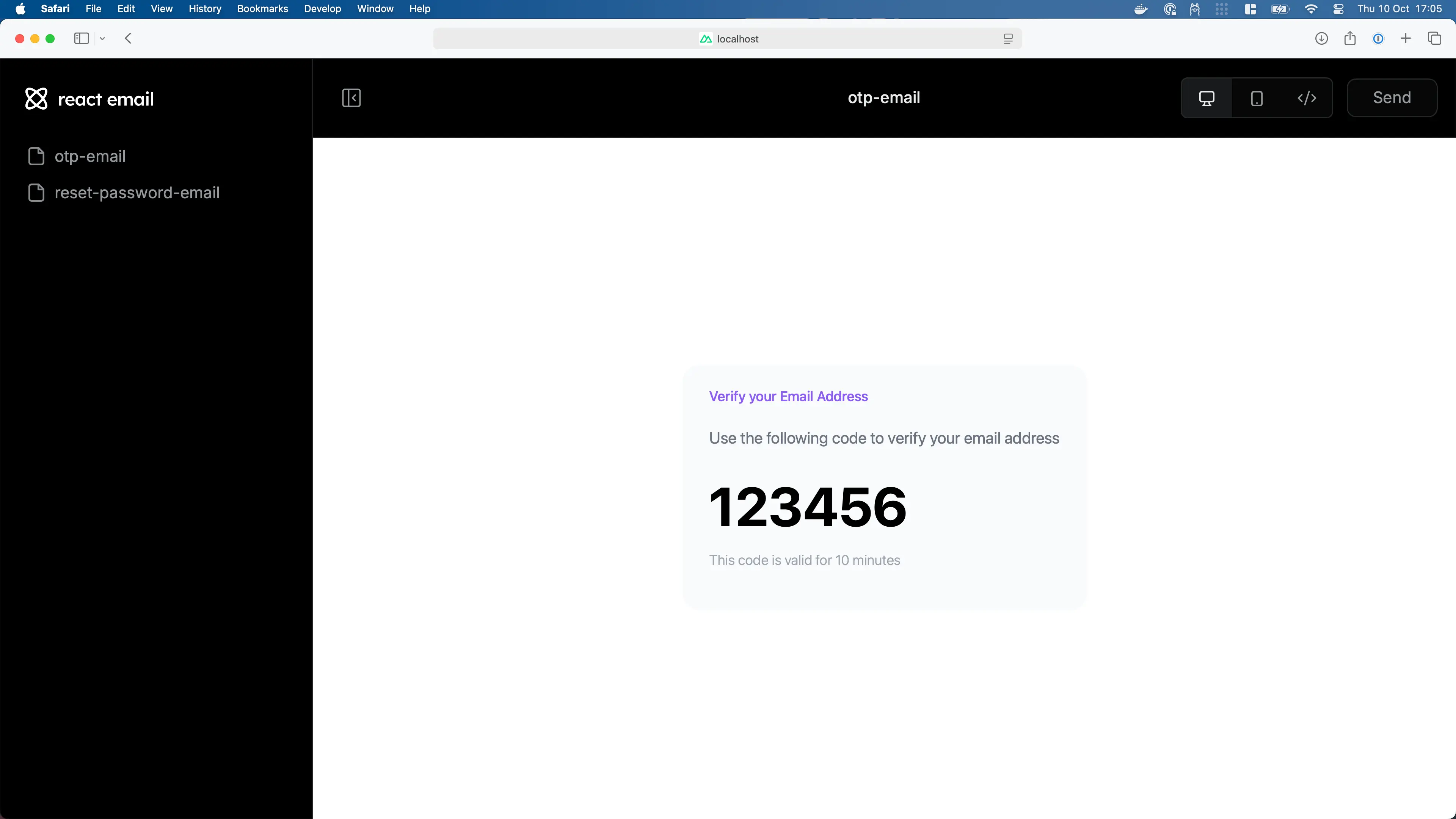
This will open a browser window with the preview of your email.
## Sending email
To send an email, we can use `react-dom/server` to render the the email then submit using a preferred provider:
::: code-group
```tsx [Nodemailer]
import { Elysia, t } from 'elysia'
import * as React from 'react'
import { renderToStaticMarkup } from 'react-dom/server'
import OTPEmail from './emails/otp'
import nodemailer from 'nodemailer' // [!code ++]
const transporter = nodemailer.createTransport({ // [!code ++]
host: 'smtp.gehenna.sh', // [!code ++]
port: 465, // [!code ++]
auth: { // [!code ++]
user: 'makoto', // [!code ++]
pass: '12345678' // [!code ++]
} // [!code ++]
}) // [!code ++]
new Elysia()
.get('/otp', async ({ body }) => {
// Random between 100,000 and 999,999
const otp = ~~(Math.random() * (900_000 - 1)) + 100_000
const html = renderToStaticMarkup()
await transporter.sendMail({ // [!code ++]
from: 'ibuki@gehenna.sh', // [!code ++]
to: body, // [!code ++]
subject: 'Verify your email address', // [!code ++]
html, // [!code ++]
}) // [!code ++]
return { success: true }
}, {
body: t.String({ format: 'email' })
})
.listen(3000)
```
```tsx [Resend]
import { Elysia, t } from 'elysia'
import OTPEmail from './emails/otp'
import Resend from 'resend' // [!code ++]
const resend = new Resend('re_123456789') // [!code ++]
new Elysia()
.get('/otp', ({ body }) => {
// Random between 100,000 and 999,999
const otp = ~~(Math.random() * (900_000 - 1)) + 100_000
await resend.emails.send({ // [!code ++]
from: 'ibuki@gehenna.sh', // [!code ++]
to: body, // [!code ++]
subject: 'Verify your email address', // [!code ++]
html: , // [!code ++]
}) // [!code ++]
return { success: true }
}, {
body: t.String({ format: 'email' })
})
.listen(3000)
```
```tsx [AWS SES]
import { Elysia, t } from 'elysia'
import * as React from 'react'
import { renderToStaticMarkup } from 'react-dom/server'
import OTPEmail from './emails/otp'
import { type SendEmailCommandInput, SES } from '@aws-sdk/client-ses' // [!code ++]
import { fromEnv } from '@aws-sdk/credential-providers' // [!code ++]
const ses = new SES({ // [!code ++]
credentials: // [!code ++]
process.env.NODE_ENV === 'production' ? fromEnv() : undefined // [!code ++]
}) // [!code ++]
new Elysia()
.get('/otp', ({ body }) => {
// Random between 100,000 and 999,999
const otp = ~~(Math.random() * (900_000 - 1)) + 100_000
const html = renderToStaticMarkup()
await ses.sendEmail({ // [!code ++]
Source: 'ibuki@gehenna.sh', // [!code ++]
Destination: { // [!code ++]
ToAddresses: [body] // [!code ++]
}, // [!code ++]
Message: { // [!code ++]
Body: { // [!code ++]
Html: { // [!code ++]
Charset: 'UTF-8', // [!code ++]
Data: html // [!code ++]
} // [!code ++]
}, // [!code ++]
Subject: { // [!code ++]
Charset: 'UTF-8', // [!code ++]
Data: 'Verify your email address' // [!code ++]
} // [!code ++]
} // [!code ++]
} satisfies SendEmailCommandInput) // [!code ++]
return { success: true }
}, {
body: t.String({ format: 'email' })
})
.listen(3000)
```
```tsx [Sendgrid]
import { Elysia, t } from 'elysia'
import OTPEmail from './emails/otp'
import sendgrid from "@sendgrid/mail" // [!code ++]
sendgrid.setApiKey(process.env.SENDGRID_API_KEY) // [!code ++]
new Elysia()
.get('/otp', ({ body }) => {
// Random between 100,000 and 999,999
const otp = ~~(Math.random() * (900_000 - 1)) + 100_000
const html = renderToStaticMarkup()
await sendgrid.send({ // [!code ++]
from: 'ibuki@gehenna.sh', // [!code ++]
to: body, // [!code ++]
subject: 'Verify your email address', // [!code ++]
html // [!code ++]
}) // [!code ++]
return { success: true }
}, {
body: t.String({ format: 'email' })
})
.listen(3000)
```
:::
::: tip
Notice that we can directly import the email component out of the box thanks to Bun
:::
You may see all of the available integration with React Email in the [React Email Integration](https://react.email/docs/integrations/overview), and learn more about React Email in [React Email documentation](https://react.email/docs)